Key Takeaways
- Minimum size: a Custom Audience needs about 100 matched people to serve. Upload 1,000+ rows to get there reliably.
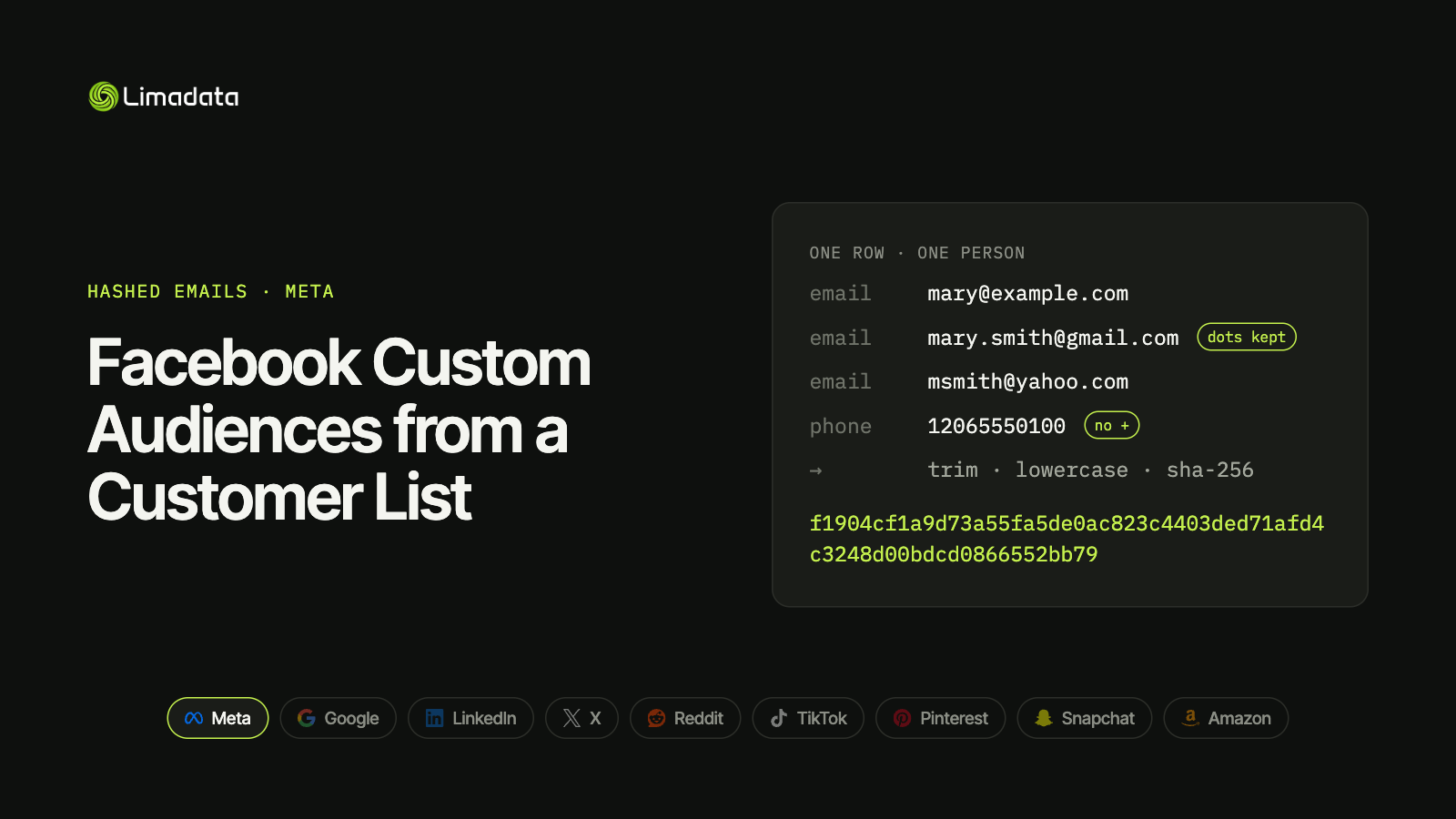
- Hash the email as typed: trim, lowercase, SHA-256. Keep Gmail dots and +tags.
- Up to 3 email columns per row, plus phone, name, location, mobile advertiser ID and external ID.
- Phones are digits only, with country code and no
+. That’s different from Google. - Hash everything except MADID (and optionally EXTERN_ID) when sending through the API.
- Match rate depends on your list, not your formatting. Personal emails and mobile numbers match far better than work emails.
Meta Custom Audiences let you upload a customer list and reach those people on Facebook, Instagram, Messenger and the Audience Network. It’s the most widely used customer-list feature in paid social, and the one where small hashing mistakes cost the most reach.
The most common mistake isn’t a typo. It’s copying Google’s rules. Meta does not want Gmail dots removed. Strip them and every dotted Gmail address on your list turns into a hash Meta can’t match.
This guide covers everything you need to build a customer-list Custom Audience that matches well: requirements, minimum size, exact hashing rules, file format, the Marketing API, and what really drives match rate. For all nine major platforms side by side, see our ultimate guide to hashed emails.
What Are Meta Custom Audiences?
A Custom Audience is a group of people you already have a relationship with, built from your own data. Meta offers three main kinds:
| Type | Built from | Needs hashed data? |
|---|---|---|
| Customer list | Emails, phones and other identifiers you upload | Yes |
| Website / app | Meta Pixel or SDK activity | No |
| Engagement | Interactions with your Facebook, Instagram or WhatsApp content | No |
This guide covers customer-list Custom Audiences, the only type that uses hashed emails. They’re used to:
- Retarget customers and leads with offers or onboarding messages.
- Exclude existing customers from acquisition campaigns.
- Seed Lookalike Audiences that find new people similar to your best customers.
- Run ABM campaigns at named contacts in target accounts, the kind of audience B2B audience platforms like Primer sync to Meta.
Like every major platform, Meta only allows data you collected yourself, with the permissions required to use it for advertising.
Facebook Custom Audience Minimum Size
A customer-list Custom Audience needs about 100 matched people before ads can deliver to it. That’s matched people, not uploaded rows.
Because match rates vary so much, plan for at least 1,000 rows per upload. A B2B list of 500 work emails can easily match fewer than 100 people and sit unusable in Ads Manager.
Two more limits worth knowing:
- Lookalikes need a seed audience of at least 100 people from a single country. Larger, high-quality seeds (1,000–50,000 people) produce better lookalikes.
- Processing usually finishes within a few hours, but can take up to 24 hours. Don’t judge match size until it’s done.
Meta’s floor is one of the lowest. Google Customer Match, X and Pinterest also need about 100 users, while LinkedIn needs 300, Amazon DSP about 2,000 and TikTok and Reddit 1,000.
How to Hash Emails for Meta
Meta’s rules are the universal rules, with nothing extra.
- Trim leading and trailing whitespace.
- Lowercase the whole address.
- Hash with plain, unsalted SHA-256.
- Encode as a 64-character lowercase hex string.
That’s it. Specifically, don’t:
- Remove dots from Gmail usernames.
- Strip
+tags(john+shop@gmail.com). - Salt, encrypt or base64-encode the hash.
- Uppercase the hex output.
Use this test vector to check your pipeline:
mary@example.com
f1904cf1a9d73a55fa5de0ac823c4403ded71afd4c3248d00bdcd0866552bb79
Why Google’s Gmail rule breaks Meta matches
Google asks advertisers to remove dots from Gmail usernames before hashing. Meta doesn’t. If you share one hashing pipeline across both platforms and apply Google’s rule everywhere, Meta gets hashes for addresses that don’t exist in its system.
| Input | SHA-256 | Send to |
|---|---|---|
john.doe@gmail.com (as typed) | 375320dd9ae7ed408002f3768e16cb5f28c861062fd50dff9a3bff62e9dce4ef | Meta |
johndoe@gmail.com (dots removed) | 06a240d11cc201676da976f7b49341181fd180da37cbe40a77432c0a366c80c3 | Google only |
The safe pattern is to compute two hashes per email: a raw hash for Meta and every other network, and a Google hash for Customer Match only. Our Google Customer Match guide covers the Google side.
Ads Manager vs the API
- Ads Manager: upload a plain-text CSV and Meta hashes it in your browser before upload. You can also upload pre-hashed values.
- Marketing API: send pre-hashed values. The API doesn’t normalize for you, so a stray capital letter or trailing space means a miss.
Customer File Format
Meta’s customer file supports more identifiers than most platforms. More identifiers per person means more chances to match.
| Key | Header | Hash it? | Normalization |
|---|---|---|---|
email | Yes | Trim, lowercase. Up to 3 email columns per row | |
| Phone | phone | Yes | Digits only, with country code, no + or leading zeros |
| First name | fn | Yes | Lowercase, no punctuation |
| Last name | ln | Yes | Lowercase, no punctuation |
| City | ct | Yes | Lowercase, no spaces or punctuation |
| State | st | Yes | Two-letter code for US, lowercase |
| Zip | zip | Yes | US: first 5 digits only |
| Country | country | Yes | Two-letter ISO code, lowercase |
| Date of birth | doby, dobm, dobd | Yes | Year, month, day as numbers |
| Gender | gen | Yes | f or m |
| Mobile advertiser ID | madid | No | Send as-is |
| External ID | extern_id | Optional | Your own customer ID |
Unlike Google, which wants Country and Zip left in plain text, Meta hashes them too. Only the mobile advertiser ID is always sent in plain text. LinkedIn is the opposite extreme: it wants names and company unhashed.
Phones: digits only, no plus sign
Meta wants phone numbers as digits only, with the country code and without the +:
| Format | Meta |
|---|---|
12065550100 | ✓ |
+12065550100 | ✗ (this is Google’s format) |
(206) 555-0100 | ✗ |
2065550100 | ✗ (no country code) |
+12065550100 and 12065550100 produce unrelated hashes. Google and TikTok both want the +, as does X, so if you advertise on any of them alongside Meta, keep both phone hashes. Snapchat uses Meta’s digits-only format. See hashed phone numbers across platforms for the full split.
Multiple emails per person
Meta allows up to three email columns in one row. If you have a work email and two personal emails for the same person, put all three in the same row rather than three separate rows. Meta treats them as one person, which keeps your counts accurate and gives each person three chances to match.
TikTok uses the same three-emails-per-row pattern. LinkedIn doesn’t, so there you add personal emails as extra rows instead.
Source: Meta Marketing API: Customer File Custom Audiences
Uploading Through the Marketing API
For automated syncs from a CRM or warehouse, use the Marketing API.
- Create the audience with
subtype=CUSTOMand acustomer_file_sourcevalue describing where the data came from. - Add users with a POST to
/{audience_id}/users, sending a schema such as["EMAIL_SHA256", "PHONE_SHA256", "FN_SHA256"]and hashed rows in the same order. - Batch up to 10,000 records per request.
- Check the response.
num_receivedandnum_invalid_entriestell you how many rows were accepted. A high invalid count almost always means a formatting or hashing problem.
A minimal payload looks like this:
{
  "payload": {
    "schema": ["EMAIL_SHA256", "PHONE_SHA256"],
    "data": [
      [
        "f1904cf1a9d73a55fa5de0ac823c4403ded71afd4c3248d00bdcd0866552bb79",
        "<sha256 of 12065550100>"
      ]
    ]
  }
}
Refresh without resetting learning
To replace an audience’s members, use the /{audience_id}/usersreplace endpoint instead of deleting and recreating the audience. Replacing keeps the same audience ID, so campaigns targeting it don’t drop back into the learning phase.
Facebook Custom Audience Match Rate
Meta shows an estimated audience size after processing, not an exact match count. Divide the matched size by your uploaded rows to estimate match rate.
Typical patterns:
- B2C lists of personal emails and mobiles match far better than any other kind of list.
- B2B lists of work emails match poorly, because people sign up for Facebook and Instagram with personal emails and phone numbers.
- Old lists match less over time as people change addresses and numbers.
How to raise your match rate
Check formatting first, then improve the list itself.
Fix formatting errors:
- Remove Google’s Gmail-dot rule from your Meta pipeline.
- Strip the
+from phones and add country codes. - Drop blank cells before hashing. An empty string hashes to
e3b0c44298fc1c149afbf4c8996fb92427ae41e4649b934ca495991b7852b855, and a column full of it is wasted. - Remove hidden characters: non-breaking spaces, tabs and byte-order marks all change the hash.
- Don’t double-hash by uploading hashed values as plain text.
Our common hashed email mistakes checklist covers these in more detail.
Then add identifiers:
- Add personal emails in the second and third email columns. This is the biggest single lever for B2B lists. A contact data API can find personal emails and phone numbers when your CRM only holds work emails.
- Add mobile numbers. Most Facebook and Instagram accounts are tied to one.
- Add name, city, state, zip and country. Each extra field gives Meta more to match on when an email misses.
The same work-email problem shows up on every consumer platform. See how it plays out on Google, TikTok and Amazon.
A Tested Python Snippet for Meta Hashes
import hashlib
import re

def sha256_hex(value: str) -> str:
    return hashlib.sha256(value.encode("utf-8")).hexdigest()

def meta_email_hash(email: str) -> str | None:
    e = email.strip().lower()
    return sha256_hex(e) if e and "@" in e else None   # keep dots and +tags

def meta_phone_hash(international_number: str) -> str | None:
    digits = re.sub(r"\D", "", international_number)   # drops +, spaces, brackets
    if digits.startswith("00"):
        digits = digits[2:]
    return sha256_hex(digits) if digits else None

def meta_name_hash(name: str) -> str | None:
    n = re.sub(r"[^\w]", "", name.strip().lower())     # lowercase, no punctuation
    return sha256_hex(n) if n else None

assert meta_email_hash("  Mary@Example.com ") == (
    "f1904cf1a9d73a55fa5de0ac823c4403ded71afd4c3248d00bdcd0866552bb79"
)
assert meta_email_hash("John.Doe@Gmail.com") == (
    "375320dd9ae7ed408002f3768e16cb5f28c861062fd50dff9a3bff62e9dce4ef"
)
assert meta_phone_hash("+1 (206) 555-0100") == sha256_hex("12065550100")
Convert domestic numbers to international format before hashing. The phonenumbers library (a port of Google’s libphonenumber) does this reliably.
If you also upload to Google, the Google Customer Match snippet returns both the Google hash and the raw Meta hash from one function.
Facebook Custom Audiences FAQ
What’s the minimum size for a Facebook Custom Audience?
About 100 matched people. Upload at least 1,000 rows to clear it, more for B2B lists.
Do I need to hash my customer list before uploading?
Not in Ads Manager, which hashes plain-text files in your browser. Through the Marketing API, yes: send SHA-256 hashes.
Should I remove dots from Gmail addresses for Meta?
No. That rule is Google-only. Meta wants the address as typed (trimmed and lowercased). Our ultimate guide to hashed emails compares which hash each platform expects.
How long does a Custom Audience take to populate?
Usually a few hours, and up to 24 hours.
Why is my Facebook Custom Audience too small?
Usually a hashing or format mistake (often Google’s Gmail rule or a + on phone numbers), or a list made mostly of work emails that don’t match Facebook accounts.
Can I create a Lookalike from a customer list?
Yes. Use a customer-list Custom Audience of at least 100 people from one country as the seed. Bigger, higher-value seeds work better.
Get Meta-Ready Hashes with Limadata
The hard part of Meta Custom Audiences for B2B isn’t hashing. It’s that work emails don’t match Facebook accounts.
Limadata’s Ad Audience API takes a LinkedIn URL or work email and returns every hashed identifier we can resolve: personal emails, mobile numbers and a full name-and-location profile, shaped for Meta’s customer file. That fills all three email columns and the phone column for each contact, which is how a B2B list goes from too small to serve to a usable audience.
Sign up free and test it on your own list, or see pricing.
Related reading:
- The Ultimate Guide to Hashed Emails (All Platforms) in 2026
- Google Customer Match in 2026: How to Hash and Upload Emails
- LinkedIn Matched Audiences: How to Hash and Upload Contact Lists
- X (Twitter) Custom Audiences and Ads API Guide
- Reddit Custom Audiences and the Reddit Ads API
- TikTok Custom Audience from a Customer File
- Pinterest Audience Targeting with Customer Lists
- Snap Audience Match and the Snapchat Marketing API
- Amazon Custom Audience Advertising: Hashed Lists for DSP and AMC