Key Takeaways
- The core recipe is universal. All nine platforms want the email trimmed, lowercased, SHA-256 hashed and sent as lowercase hex.
- Only Google strips Gmail dots. Keep two hashes per email: a raw hash for Meta, LinkedIn, X, Reddit, TikTok, Pinterest, Snapchat and Amazon, and a dots-removed hash for Google only.
- Phones split the industry in two. Meta and Snapchat want digits only; Google, X and TikTok want E.164 with the leading
+. Keep two phone hashes as well. - Hashed versus plain text varies. Google wants Country and Zip unhashed, LinkedIn wants names unhashed, and Meta and Amazon want everything hashed.
- File shape matters as much as hashing. Pinterest takes a single column, Snapchat and X take one identifier type per upload, and TikTok and Meta’s Ads Manager allow up to three emails per row.
- Minimums range from 100 to 1,000 matched users. LinkedIn needs 300, Reddit and TikTok need 1,000, so upload well above each floor.
- More emails per person beats better formatting. Adding personal emails and mobile numbers to a work-email list is the biggest lever on match rates, especially on consumer platforms.
Every major ad platform matches your customer list the same basic way: trim, lowercase, SHA-256, hex. The one rule that breaks the pattern is Gmail dots. Google is the only platform that documents stripping them, and copying that rule to Meta, TikTok or anyone else quietly turns matchable emails into hashes that will never join.
This guide covers nine platforms: Meta, Google, LinkedIn, X, Reddit, TikTok, Pinterest, Snapchat and Amazon. For each one you get the exact email normalization, the header or API key to use, file and batch limits, and the minimum audience size. After that come a side-by-side table, the rules for phones, mobile ad IDs and names (which diverge far more than email does), and a tested code snippet you can drop into your pipeline.
Specs were checked against each platform’s own documentation where it’s public, and each platform section links to its primary source. Where a platform’s docs are silent, we say so. Platforms change these rules often, so confirm against the linked source before a big upload.
How to Hash Emails for Ad Platforms: The Universal Rules
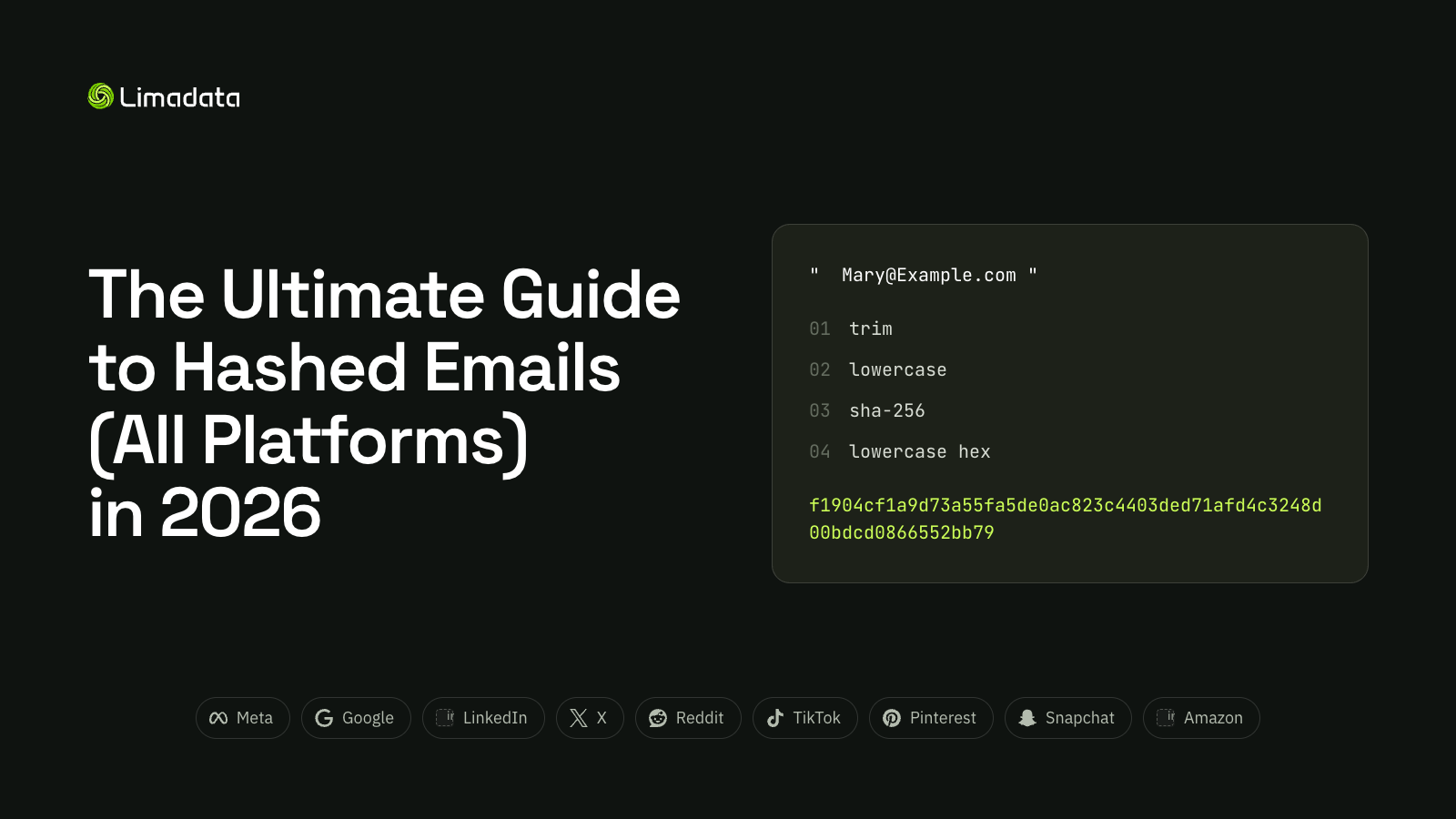
All nine platforms accept SHA-256 hashed emails, and all nine expect the same core prep:
- Trim leading and trailing whitespace.
- Lowercase the entire address.
- Hash with plain, unsalted SHA-256. MD5, SHA-1 and salted hashes won’t match on most platforms.
- Encode the digest as a 64-character lowercase hex string.
Use this test vector to check your pipeline. If your code doesn’t produce this exact output, nothing you upload will match:
mary@example.com
f1904cf1a9d73a55fa5de0ac823c4403ded71afd4c3248d00bdcd0866552bb79
Why Every Email Needs Two Hashes (Gmail Dots)
Because Google wants Gmail dots removed and everyone else wants the address as the user typed it, the cleanest architecture keeps two hashes per email:
- Raw hash: trimmed and lowercased only. Send this to every platform except Google.
- Google hash: the same, with dots removed from the username of gmail.com and googlemail.com addresses. Send this to Google only.
The two digests share nothing. john.doe@gmail.com and johndoe@gmail.com hash to completely different values, so the wrong one for a platform is a guaranteed miss, not a partial match. For non-Gmail domains, both hashes come out identical.
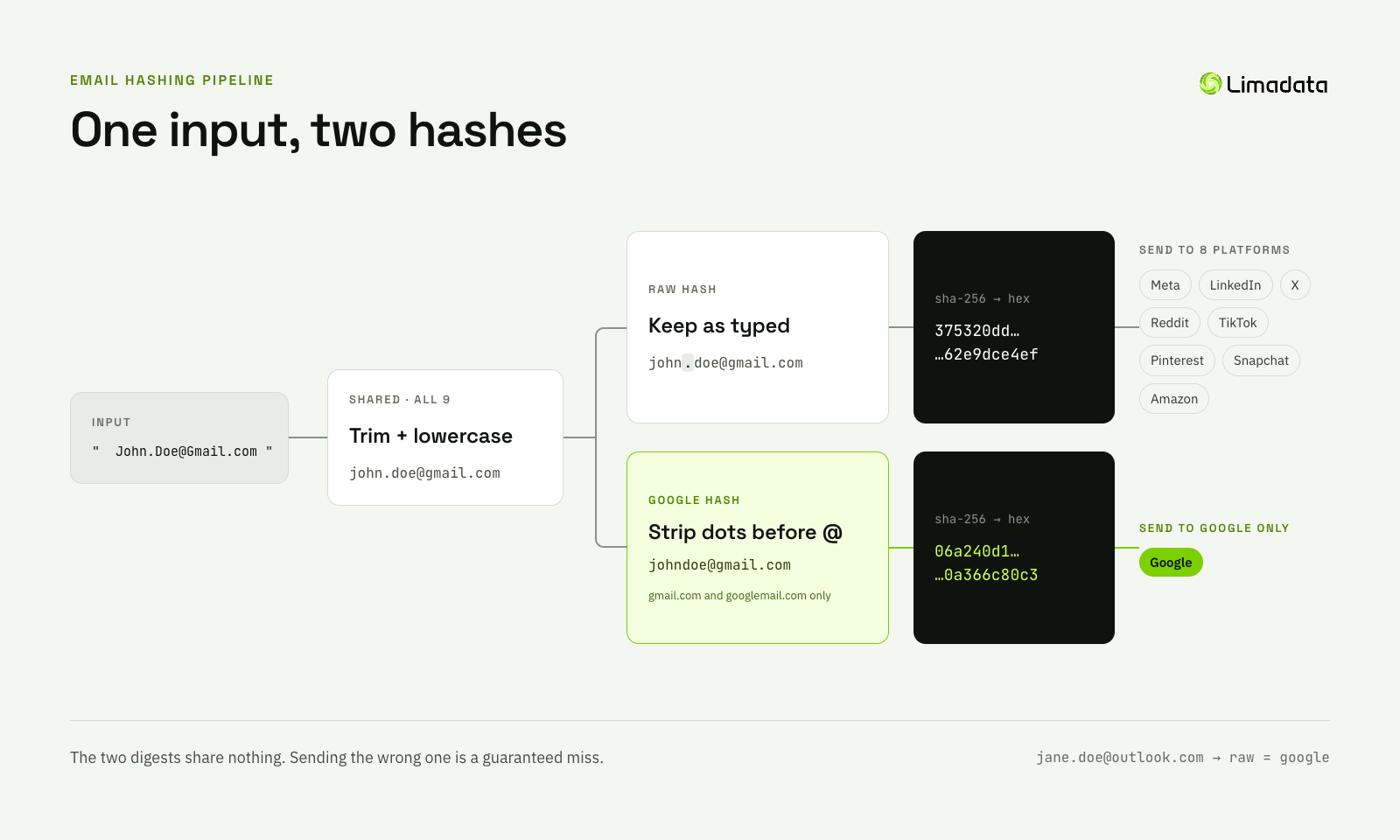
Every platform shares the first step; only Google’s branch strips dots, and for non-Gmail domains both branches produce the same hash.
If you’d rather not maintain this logic yourself, Limadata’s Ad Audience API returns both the original and the normalized hash for every email it finds, already shaped for the network you’re uploading to.
Meta (Facebook) Hashed Emails for Custom Audiences
Meta wants the email trimmed, lowercased, SHA-256 hashed and sent as lowercase hex. Its spec lists only those two normalization steps, so send the raw hash: don’t strip Gmail dots or +tags. For the full workflow, see our Facebook Custom Audiences guide.
| Spec | Meta |
|---|---|
| Hash | SHA-256 only, lowercase hex |
| Email normalization | Trim whitespace, lowercase; nothing else |
| File header | email (up to 3 email columns per row in Ads Manager) |
| API schema key | EMAIL (or EMAIL_SHA256 for single-key payloads) |
| Batch size (API) | Up to 10,000 records per request, unlimited total |
| Minimum to serve | 100 matched users |
| Hashes for you? | Yes in Ads Manager (hashed in the browser); no via API |
| Processing time | Usually up to 24 hours |
Worth knowing:
- Meta is the most generous platform for extra keys. Send email alongside
PHONE,FN,LN,CT,ST,ZIP,COUNTRY,GENand birth-date fields in the same row. All must be normalized and hashed; mobile ad IDs (MADID) andEXTERN_IDare the exceptions. EXTERN_IDis optional. Meta gives it lower precedence than hashed PII, and its docs don’t say it merges rows into one person. It’s useful mainly for removals.- Each response returns
num_invalid_entriesand up to 100invalid_entry_samples. Check these on your first batch; a non-zero count usually means a normalization bug. - Use
/usersreplacefor full refreshes. Unlike add/remove calls, it doesn’t reset the ad set’s learning phase. - Customer list audiences unused in active ad sets for over two years are flagged for deletion.
Source: Meta Marketing API: Customer File Custom Audiences
Google Ads Hashed Emails for Customer Match
Google is the one platform with an extra email rule: remove every period before the @ in gmail.com and googlemail.com addresses, then trim, lowercase and SHA-256 hash to hex. Google owns Gmail and knows the dots don’t matter for delivery, so its match keys ignore them. Skip the rule and many of your Gmail users won’t match. For the full workflow, see our Google Customer Match hashing and upload guide.
| Spec | |
|---|---|
| Hash | SHA-256, hex |
| Email normalization | Trim, lowercase, remove dots before @ for gmail.com and googlemail.com only |
| File format | CSV, ASCII or UTF-8 (UTF-16 not supported) |
| Column header | Email (exact English header; multiple Email columns allowed) |
| Minimum to serve | 100 active users in the last 30 days, on Search, Display and YouTube |
| Hashes for you? | Yes in the UI (hashed on your computer); API uploads must be pre-hashed |
| Processing time | Up to 48 hours |
| Membership duration | Up to 540 days |
Worth knowing:
- Don’t touch non-Google domains.
jane.doe@outlook.comkeeps its dot. Google’s Customer Match help page asks only for dot removal, not+tagremoval, so leave tags alone unless you’ve tested otherwise. - Contact lists and mobile IDs don’t mix. A Customer Match list holds one data type, so a
Mobile Device IDcolumn can’t sit in an email file. Upload device IDs as their own list. - Address matching needs all four of
First Name,Last Name,CountryandZip. Names are hashed, but Country and Zip must stay unhashed. - Customer Match is first-party only: Google’s policy allows customer information you collected yourself.
- Google now steers new integrations to Data Manager and the Data Manager API, which takes up to three email addresses per audience member.
- The minimum dropped from 1,000 to 100 active users for Search and YouTube in December 2025. Older guides quoting 1,000 are out of date, though Google still recommends uploading thousands of rows to clear it.
Source: Google Ads Help: Create a Customer Match list
LinkedIn Hashed Emails for Matched Audiences
LinkedIn wants email lowercased, all whitespace removed, then SHA-256 hashed to hex; hex case doesn’t matter. Keep Gmail dots. The real constraint is size: an audience needs 300 matched members before it will serve. For the full workflow, see our LinkedIn Matched Audiences guide.
| Spec | |
|---|---|
| Hash | SHA-256 hex (API also accepts SHA-512) |
| Email normalization | Lowercase, remove all whitespace |
| File format | CSV, UTF-8, header row first |
| Column header | email (one per row; duplicate headers rejected) |
| API id type | SHA256_EMAIL or SHA512_EMAIL on dmpSegments/{id}/users |
| List size | Up to 300,000 rows; 10,000+ recommended |
| Minimum to serve | 300 matched members |
| Hashes for you? | Yes in Campaign Manager; API list uploads must be pre-hashed |
Worth knowing:
- Don’t trust LinkedIn’s sample hash. Its docs say
abc@example.comhashes tofa922cb4…, but SHA-256 of that string is actually9eceb13483d7f187ec014fd6d4854d1420cfc634328af85f51d0323ba8622e21, and we couldn’t reproduce LinkedIn’s value with any common variant. Test against the universal vector above instead. - Name columns are plain text, not hashed.
firstname,lastname(35 characters max),employeecompany,titleandcountrygo in unhashed. A 64-character hash infirstnamewon’t match. - Phone numbers aren’t accepted in contact lists. Android ad IDs are, as plain-text
googleaid; there’s no IDFA field. - Work emails match poorly because most members log in with a personal address. Adding a personal email for the same person, as a second row with the same name and company, is the biggest single lever on LinkedIn reach.
- CSV list-upload segments are static. Use a streaming DMP segment via the
dmpSegments/usersAPI for near-real-time adds and removes. Replacing a CSV audience pauses campaigns using it until the new list processes (24–48 hours).
Source: LinkedIn Marketing API: DMP Segment List Uploads
X (Twitter) Hashed Emails for Custom Audiences
X follows the standard recipe: lowercase, trim, unsalted SHA-256, lowercase hex. Pre-hashing is optional in the UI, and an audience needs 100 matched users active in the past 90 days to be targetable.
| Spec | X |
|---|---|
| Hash | SHA-256, unsalted, lowercase hex (uppercase hex is explicitly rejected) |
| Email normalization | Lowercase, remove leading/trailing spaces |
| File format | .csv, .tsv or .txt; one hashed value per line |
| Columns | One identifier type per column; dedicated lists per type in the UI |
| Batch size (API) | Up to 2,500 users per request |
| Minimum to serve | 100 matched users |
| Hashes for you? | Yes in the UI (pre-hashing optional); no via API |
| Processing time | Up to 48 hours |
Worth knowing:
- The API endpoint is
POST accounts/:account_id/custom_audiences/:custom_audience_id/users. It takes several identifiers per user (email, phone, handle, device ID) as arrays; everything exceptpartner_user_idmust be normalized and hashed. - Users who turned off ads personalization can’t be matched, so expect sizes below your upload count.
- For files over 4 GB, X recommends splitting them into smaller uploads.
- The same email rules apply to Do Not Reach Lists, which also need 100 matched users before they activate.
Source: X Ads API: Custom Audiences user data
Reddit Hashed Emails for Custom Audiences
Reddit takes the standard raw hash: trim, lowercase, SHA-256, hex. Its own upload example hashes user@email.com with no further changes, and nothing in Reddit’s docs asks you to strip dots or aliases. An audience needs 1,000 matched users before it can run, the highest bar here alongside TikTok.
| Spec | |
|---|---|
| Hash | SHA-256, hex |
| Email normalization | Trim, lowercase; keep Gmail dots |
| File format | CSV up to 500 MB, using Reddit’s template headers unchanged |
| Column headers | Emails (hashed), Emails (unhashed), Mobile Ad IDs (unhashed) |
| API identifiers | EMAIL_SHA256, MAID_SHA256 (hashed values only) |
| API endpoint | PATCH /api/v3/custom_audiences/{audience_id}/users with action_type ADD or REMOVE |
| Minimum to serve | 1,000 matched users |
| Hashes for you? | Ads Manager accepts unhashed emails; the API accepts hashed only |
Worth knowing:
- Test vector from Reddit’s own template:
user@email.com→0925f997eb0d742678f66d2da134d15d842d57722af5f7605c4785cb5358831b. We verified it; it’s the plain trimmed, lowercased hash. - Don’t strip dots or
+tagsfor Reddit. Reddit doesn’t document either step, and stripping them breaks the plain hash for dotted addresses. If you’re curious, upload the same list both ways and compare matched counts. - Don’t rename Reddit’s template headers; changed or deleted headers cause upload errors.
- Reddit reads MAID case as device type: unhashed Android IDs lowercase, iOS IDFAs uppercase (per its Conversions API docs).
- Send additions before removals on syncs so the audience never dips below the 1,000-user floor. The customer list API has no membership duration parameter.
Source: Reddit Business Help: Custom Audiences
TikTok Hashed Emails for Custom Audiences
TikTok uses the standard recipe (remove spaces, lowercase, SHA-256) and keeps Gmail dots. Label pre-hashed columns Email_SHA256. The bar is high: files need at least 1,000 entries, and an audience needs 1,000 matched users to target. For the full workflow, see our TikTok custom audience guide.
| Spec | TikTok |
|---|---|
| Hash | SHA-256 hex (MD5 also accepted) |
| Email normalization | Remove spaces, lowercase |
| File format | CSV or TXT (no zip), under 1 GB, header row required |
| Column header | Email (unhashed) or Email_SHA256 (pre-hashed) |
| Emails per row | Up to 3 (each header may appear 3 times per file) |
| Minimum file size | 1,000 entries |
| Minimum to serve | 1,000 matched users |
| Hashes for you? | Yes, unhashed values are hashed automatically |
| Audience limit | Up to 400 custom audiences per account |
Worth knowing:
- Pack multiple emails into one row. TikTok, like Meta’s Ads Manager, lets a single row carry three email columns, so a person’s work email and two personal emails can travel together without duplicating rows. Phone and MAID headers can repeat three times too.
- Keep casing and hashing consistent across the whole file. Don’t mix hashed and unhashed values in one column.
- Through the API, append, remove and replace operations fail if they would leave the audience under 1,000.
- File-based uploads are limited to one per day per audience. For frequent syncs, use TikTok’s Segment API instead.
Source: TikTok Business Help: Create a Custom Audience with a customer file
Pinterest Hashed Emails for Customer Lists
Pinterest is the most restrictive file format of the nine: one column, emails only, no extra fields. Hash with trimmed, lowercased SHA-256 (it also takes MD5 or cleartext) and keep Gmail dots.
| Spec | |
|---|---|
| Hash | SHA-256, MD5, or cleartext |
| Email normalization | Trim, lowercase |
| File format | Single-column CSV; emails or MAIDs, never both |
| Extra fields | None: Pinterest says to leave out names, phones and addresses |
| API | customer_lists endpoints in API v5 |
| Minimum to serve | 100 matches |
| Hashes for you? | Yes, uploads are hashed on arrival |
| Processing time | Usually 48–72 hours for a new audience |
Worth knowing:
- A multi-column CRM export will fail. Split out a dedicated email-only file before upload.
- Cleartext emails must include an @, which Pinterest uses as a sanity check.
- Mobile IDs go in their own list. Pinterest’s help page asks for Android ad IDs in lowercase 8-4-4-4-12 format, and its policy doesn’t allow iOS IDFAs.
- Pinterest hashes lists immediately; you can add, remove or replace members, but you can’t download a list back.
Source: Pinterest Help: Customer list audiences
Snapchat Hashed Emails for Snap Audience Match
Snapchat wants email trimmed, lowercased and SHA-256 hashed to lowercase hex, with Gmail dots kept. Its distinguishing rule is isolation: every request carries exactly one identifier type.
| Spec | Snapchat |
|---|---|
| Hash | SHA-256, lowercase hex (required via API) |
| Email normalization | Trim, lowercase |
| API schema | EMAIL_SHA256 (also PHONE_SHA256, MOBILE_AD_ID_SHA256) |
| Mixing identifiers | Not allowed: one schema type per request |
| Batch size (API) | Up to 100,000 identifiers per request |
| Retention | Set per segment; default is lifetime (9999) |
| Minimum to serve | Not published; check for targetable_status = TOO_FEW_USERS |
Worth knowing:
- Upload emails, phones and MAIDs as separate batches or files, even for the same person.
- Snapchat’s MAIDs are hashed too (lowercase, hyphens kept, then SHA-256), unlike Meta and Google, which take them in plain text.
- Poll the segment’s
upload_statusuntil it readsCOMPLETEbefore judging its size, andDELETE /segments/{id}/all_usersclears a list without deleting it.
Source: Snap Marketing API: Customer Lists
Amazon Ads Hashed Emails for DSP and AMC
Amazon onboards first-party audiences into Amazon DSP and Amazon Marketing Cloud through Ads Data Manager. Email follows the standard recipe: trim, lowercase, SHA-256, hex, with Gmail dots kept. For the full workflow, see our Amazon custom audiences guide.
| Spec | Amazon |
|---|---|
| Hash | SHA-256, lowercase hex |
| Email normalization | Trim, lowercase |
| Extra keys | Phone, name, street address, city, state, zip, country (all hashed), plus MAIDs |
| Identifier priority | Hashed PII first, then MAIDs, then external IDs |
| Hashing help | Amazon publishes an open-source normalization SDK for address fields |
Worth knowing:
- Email is Amazon’s strongest key because it’s the login credential for Amazon accounts.
- Amazon is one of only two platforms here (with Meta) that accepts a full name-and-address profile next to email. Hash every one of those fields.
- We couldn’t find a public Amazon page spelling out audience file formats, so the details above come from Amazon’s open-source normalization SDK. Confirm minimum audience sizes in your account before you plan a small-list campaign.
Source: Amazon Ads audience normalization SDK
Hashed Email Specs Compared Across All Platforms
All nine agree on SHA-256 hex of a trimmed, lowercased address. Only Google strips Gmail dots; the real differences are file shape and audience minimums.
| Platform | Hash to send | Pre-hashed header / key | Other keys in same row? | Minimum matched audience |
|---|---|---|---|---|
| Meta | Raw | email / EMAIL | Yes: phone, names, location, MAID | 100 |
| Gmail dots removed | Email | Yes, except mobile IDs | 100 active (30 days) | |
| Raw (all whitespace removed) | email / SHA256_EMAIL | Yes: plain-text names, company, title, country, AAID | 300 | |
| X | Raw | One value per line | No: one identifier type per list | 100 |
| Raw | Emails (hashed) / EMAIL_SHA256 | MAIDs only | 1,000 | |
| TikTok | Raw | Email_SHA256 (up to 3 per row) | Yes: phone, MAID | 1,000 |
| Raw | Single column | No | 100 | |
| Snapchat | Raw | EMAIL_SHA256 | No: one schema per request | Not published |
| Amazon | Raw | Hashed email field | Yes: phone, names, address, MAID | Check your account |
The safest strategy: compute both hashes once in your warehouse, send the Google hash to Google and the raw hash everywhere else, and build a separate export per platform rather than one file for all. An ad audience endpoint that formats rows for a specific network can do the per-platform shaping for you.
Hashed Phone Numbers, Mobile Ad IDs and Names
Email rules are nearly uniform. The extra match keys are not, and they’re where most multi-platform pipelines break. The phone + alone splits the industry in two: 12065550100 and +12065550100 produce unrelated hashes, so the wrong format for a platform matches nothing.
| Platform | Phone before hashing | Mobile ad IDs | Names and location |
|---|---|---|---|
| Meta | Digits only with country code, no +, leading zeros dropped | MADID, plain text, lowercase, hyphens kept | All hashed (FN, LN, CT, ST, ZIP, COUNTRY) |
| E.164 with + | Separate list only, unhashed; don’t mix iOS and Android in one upload | First/last name hashed; Country and Zip unhashed; all four required | |
| Not accepted | googleaid (Android only), plain text | Plain text first/last name, company, title, country | |
| X | E.164 with + | Lowercase with hyphens, then hashed | Not accepted |
| Not in the customer-list template | Mobile Ad IDs (unhashed): Android lowercase, iOS uppercase | Not accepted | |
| TikTok | E.164 with + (also takes it without) | MAID, consistent casing, up to 3 per row | Not accepted |
| Not accepted in files | Own list; Android IDs lowercase, no IDFAs | Not accepted | |
| Snapchat | Digits only with country code, no +, leading zero dropped | Lowercase, hyphens kept, then hashed | Not accepted |
| Amazon | Hashed (check format in your account) | Supported | All hashed, including street address |
Three rules of thumb from the table:
- Keep two phone hashes, just like email: a digits-only hash for Meta and Snapchat, an E.164 hash for Google, X and TikTok. Convert domestic numbers first, dropping the trunk zero (UK
07123 456789becomes447123456789or+447123456789). Limadata’s ad audiences return phones hashed in both formats. - Hashed versus plain text flips by platform. Google wants Country and Zip unhashed in an otherwise hashed file; LinkedIn wants names unhashed; Meta and Amazon want everything hashed. Never reuse one demographics column across platforms.
- Treat MAIDs as perishable. Drop the all-zero ID
00000000-0000-0000-0000-000000000000, which means the user opted out of tracking. Since iOS App Tracking Transparency, most IDFAs are unavailable, so send the most recent few IDs per person rather than a long history.
Prefer mobile numbers over landlines and direct dials, which are rarely tied to a consumer social account. Name-and-address matching on its own is weak and risks matching the wrong person, so use it to back up an email or phone, not replace one.
Sending Multiple Hashed Emails per Person
The fastest way to lift match rates isn’t better hashing; it’s sending more of each person’s addresses. Every extra email or phone is another chance to hit the one the person used to sign up.
This matters most in B2B. CRM lists are mostly work emails, but people sign up for Facebook, TikTok and Snapchat with personal addresses, and many LinkedIn members log in with one too. A list of only @company.com addresses can match a small fraction of people on consumer platforms. Adding a known personal email for the same person, and a mobile number where you have one, typically does more for reach than any formatting fix. Personal addresses also last: work emails churn whenever someone changes jobs. If your CRM only has work emails, a people data API can find personal emails and phone numbers from a work email or LinkedIn URL.
How to send them depends on the platform:
- Several columns in one row: TikTok and Meta’s Ads Manager take up to three email columns per row, and Google’s Data Manager API takes up to three emails per audience member.
- One row per email: everywhere else, including Meta’s API, whose docs don’t support a repeated
EMAILkey in one schema. Repeat the person’s other fields on each row where the platform allows them (LinkedIn name and company, Meta name and location), so every row stands on its own. - One identifier per file: Pinterest, Snapchat, X and Google’s mobile-ID lists. Put all of a person’s emails in the email file, and phones or device IDs in their own uploads.
One caution: duplicate rows for the same person inflate your upload count, not your audience. Judge success by matched users, never rows sent.
Common Hashed Email Mistakes (and a Tested Python Snippet)
Most low match rates come from a handful of preventable bugs, not from the platforms:
- Stripping Gmail dots for everyone. Only Google wants it. Sending the Google hash to Meta, TikTok or Reddit misses every user who signed up with a dot.
- Using one phone format everywhere. Meta and Snapchat want digits only; Google, X and TikTok want the leading
+. Pick wrong and nothing matches. - Double hashing. Uploading hashed values under an unhashed header, or letting an upload tool re-hash them, produces a hash of a hash.
- Hashing what should stay plain. Google’s Country and Zip, LinkedIn’s names and Meta’s mobile ad IDs all go in unhashed.
- Uppercase hex. X explicitly rejects it, and Meta and Snapchat ask for lowercase. Always emit lowercase.
- Hidden characters. Trailing newlines, tabs, non-breaking spaces and UTF-8 byte-order marks change the hash. Hash only the bytes of the clean string.
- Hashing blanks. An empty cell hashes to
e3b0c442…b855. Drop empty values first, or thousands of rows collapse into one junk value. If a sample file shows that hash for real data, the file is broken. - Mixing identifier types where they’re banned. Pinterest, Snapchat and X want one identifier type per upload, and Google won’t take mobile IDs in a contact list.
- Undersized lists. Upload well above each minimum. A 1,000-row list can easily match fewer than 300 people on LinkedIn, or fewer than 1,000 on Reddit and TikTok.
This Python module produces both email hashes and both phone hashes, with assertions you can run as tests:
import hashlib
import re

GOOGLE_MAIL_DOMAINS = {"gmail.com", "googlemail.com"}

def sha256_hex(value: str) -> str:
    return hashlib.sha256(value.encode("utf-8")).hexdigest()

def email_hashes(email: str) -> dict:
    """Return the raw hash (every platform but Google) and the Google hash."""
    e = email.strip().lower()
    if not e or "@" not in e:
        return {}
    local, _, domain = e.rpartition("@")
    google = f"{local.replace('.', '')}@{domain}" if domain in GOOGLE_MAIL_DOMAINS else e
    return {"raw": sha256_hex(e), "google": sha256_hex(google)}

def phone_hashes(international_number: str) -> dict:
    """Input must include the country code, e.g. '+1 (206) 555-0100' or '0044 7123 456789'."""
    digits = re.sub(r"\D", "", international_number)
    if digits.startswith("00"):
        digits = digits[2:]  # international dialing prefix
    if not digits:
        return {}
    return {
        "digits": sha256_hex(digits),       # Meta, Snapchat
        "e164": sha256_hex("+" + digits),   # Google, X, TikTok
    }

assert email_hashes("  Mary@Example.com ")["raw"] == (
    "f1904cf1a9d73a55fa5de0ac823c4403ded71afd4c3248d00bdcd0866552bb79"
)
assert email_hashes("John.Doe@Gmail.com")["google"] == email_hashes("johndoe@gmail.com")["raw"]
assert email_hashes("jane.doe@outlook.com")["google"] == email_hashes("jane.doe@outlook.com")["raw"]
assert phone_hashes("+1 (206) 555-0100")["e164"] == sha256_hex("+12065550100")
assert phone_hashes("001-206-555-0100")["digits"] == sha256_hex("12065550100")
The phone function expects numbers that already carry a country code. Convert domestic numbers first with a library such as Google’s phonenumbers, which also drops trunk zeros correctly.
Finally, hashing is not anonymization. Regulators generally treat hashed emails as personal data, so consent and each platform’s customer list terms still apply. Google, for one, allows only data you collected first-hand.
Get Ad-Ready Hashed Emails with Limadata
Everything above is what Limadata’s Ad Audience API handles for you. Send a LinkedIn URL or work email and get back every hashed identifier we can resolve (work and personal emails, phones, names and location), normalized to the spec of the network you’re uploading to, with 75–95% match rates across major ad platforms. Pricing is credit-based with a free tier; see the pricing page for per-endpoint costs, or sign up free and test it against your own list.
Platform deep dives:
- Facebook Custom Audiences from a Customer List
- Google Customer Match in 2026: How to Hash and Upload Emails
- LinkedIn Matched Audiences: How to Hash and Upload Contact Lists
- TikTok Custom Audience from a Customer File
- Amazon Custom Audience Advertising: Hashed Lists for DSP and AMC
Comparing audience tools? See our breakdowns of the best Vector alternatives, best Primer alternatives and top Influ2 alternatives. Building the list itself? Our roundup of the best data enrichment tools compares the options for filling in missing contact details.