Key Takeaways
- Customer Match needs 100 active users to serve on Search and YouTube. The threshold dropped from 1,000 in December 2025.
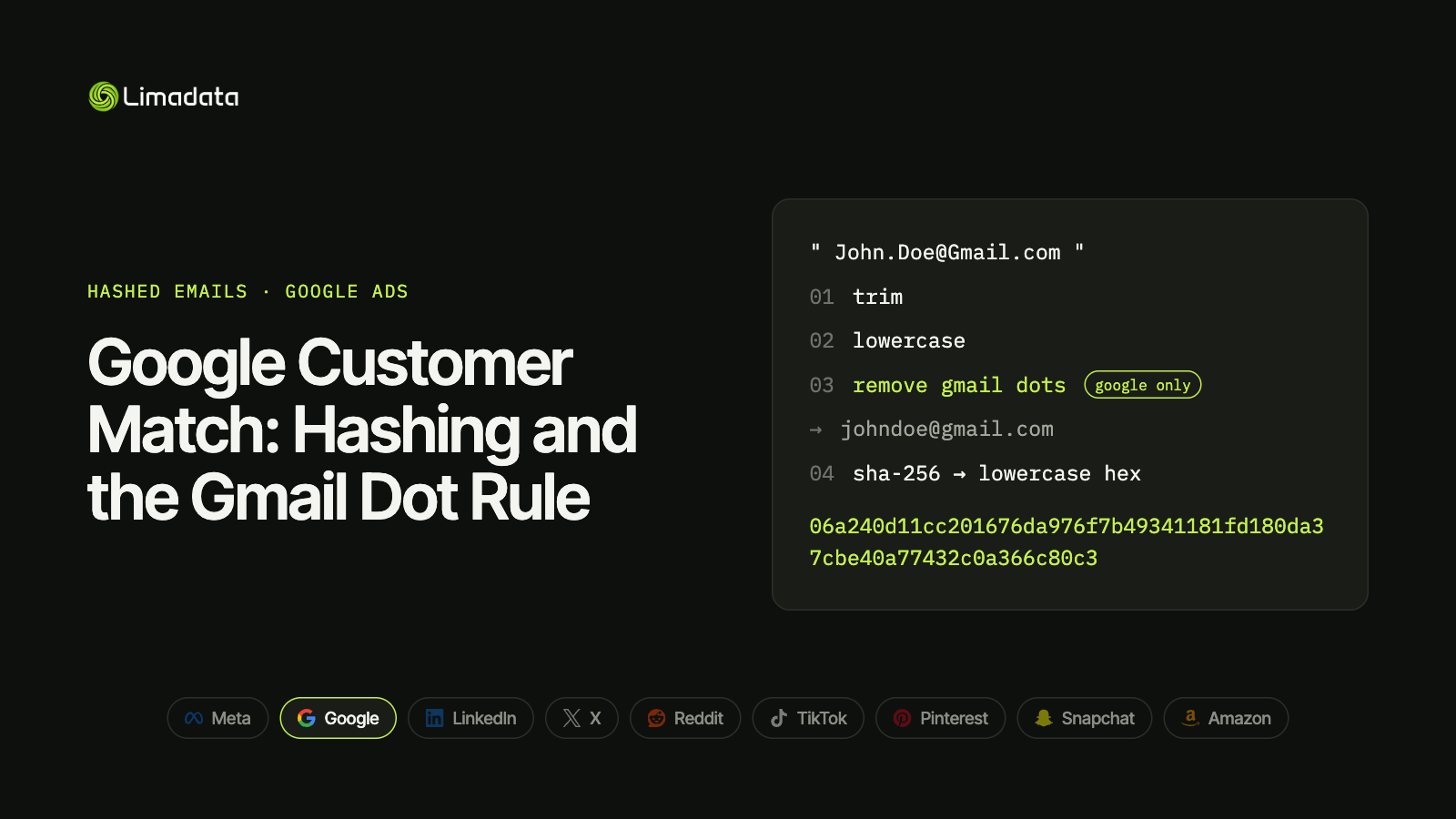
- Remove dots from Gmail usernames (gmail.com and googlemail.com only) before hashing. No other major ad platform asks for this.
- Keep two hashes per email: a Google hash for Customer Match and a raw hash for every other network.
- Country and Zip stay unhashed. Email, phone and names are hashed.
- Phones use E.164 with the
+before hashing. - Work-email lists match poorly. Adding personal emails and mobile numbers is the biggest lever on list size.
Google Customer Match lets you upload your own customer list and show ads to those people across Google’s properties. The hashing recipe is almost the same as every other ad platform: trim, lowercase, SHA-256, hex. Almost.
Google is the only major ad platform that wants Gmail dots removed before hashing. Skip that step and a slice of your Gmail users will never match. Copy it to Meta, LinkedIn or TikTok and you break matches there instead.
This guide covers the full Customer Match workflow for 2026: requirements, exact hashing rules, file format, upload options, and how to fix a list that matches poorly. For the rules on all nine major platforms side by side, see our ultimate guide to hashed emails.
What Is Google Customer Match?
Customer Match is Google Ads’ first-party audience feature. You upload contact information your customers gave you, and Google matches it against signed-in Google accounts. Matched users can then be targeted, excluded or used as a signal in your campaigns.
Customer Match lists can reach people on Search, Shopping, YouTube, Gmail and Display. They also work as audience signals in Performance Max and Demand Gen campaigns.
Common uses:
- Retargeting customers with upsell or renewal messages.
- Excluding customers from acquisition campaigns, so you stop paying to reach people who already bought.
- Bidding higher on Search when a known lead or customer searches your category.
- Reaching an ABM list of named contacts at target accounts, the same job person-level ad targeting tools like Influ2 are built for.
Customer Match is strictly first-party. Google’s policy only allows data you collected directly from your customers, so purchased or rented lists are not permitted.
Google Customer Match Requirements in 2026
Before you build a file, check these requirements.
| Requirement | Google Customer Match |
|---|---|
| Account eligibility | Account in good standing with a good policy compliance history; Google checks eligibility before you can use Customer Match |
| Data source | First-party only, collected directly from your customers |
| File format | CSV, ASCII or UTF-8 (UTF-16 not supported) |
| Minimum file size | 100 user records |
| Minimum to serve | 100 active users in the last 30 days, on Search, Display and YouTube |
| Membership duration | Up to 540 days |
| Processing time | Up to 48 hours |
| Hashing | SHA-256, lowercase hex; optional in the UI, required via API |
The 100-user minimum
In December 2025, Google lowered the minimum for Search and YouTube from 1,000 active users to 100. Many guides still quote 1,000, so check the date on anything you read.
“Active” matters. Google counts users on your list who have been active on its properties in the last 30 days, not every row you upload. A 300-row file of work emails can easily fall below 100 active matched users, so upload well above the floor.
Google’s floor is now one of the lowest. Meta needs about 100 matched people, LinkedIn 300, TikTok 1,000 and Amazon DSP about 2,000.
Source: Google Ads Help: Create a Customer Match list
How to Hash Emails for Google Customer Match
Google’s rules are the universal rules plus one extra step.
- Trim leading and trailing whitespace.
- Lowercase the entire address.
- Remove dots from the username (before the @), but only for
gmail.comandgooglemail.comaddresses. - Hash with plain, unsalted SHA-256.
- Encode the result as a 64-character lowercase hex string.
Why Google strips Gmail dots
Gmail ignores dots in usernames. john.doe@gmail.com, johndoe@gmail.com and j.o.h.n.d.o.e@gmail.com all deliver to the same inbox. Google owns Gmail, so its matching keys ignore the dots too.
But SHA-256 doesn’t know that. Dotted and undotted versions produce completely different hashes:
| Input | SHA-256 |
|---|---|
john.doe@gmail.com | 375320dd9ae7ed408002f3768e16cb5f28c861062fd50dff9a3bff62e9dce4ef |
johndoe@gmail.com | 06a240d11cc201676da976f7b49341181fd180da37cbe40a77432c0a366c80c3 |
If you send the dotted hash, Google may not match it to the account. Send the undotted one.
Don’t touch other domains
The dot rule applies to Gmail only. jane.doe@outlook.com keeps its dot, because Outlook, Yahoo and corporate mail servers treat dots as real characters. Stripping them would turn a valid address into a different (often nonexistent) one.
What about +tags?
Google’s Customer Match help pages ask for dot removal on Gmail but don’t ask you to strip +tags (john+shop@gmail.com). Some coverage of Google’s newer Data Manager API documentation reports that it also strips plus-addressing for Gmail. If many of your contacts use +tags, test both versions on a sample list and compare matched counts before committing to one.
Test vector
Use this to check your pipeline. If your code doesn’t produce this exact output, nothing you upload will match:
mary@example.com
f1904cf1a9d73a55fa5de0ac823c4403ded71afd4c3248d00bdcd0866552bb79
Keep two hashes per email
Because only Google strips dots, the cleanest setup computes two hashes for every email:
- Google hash: trimmed, lowercased, Gmail dots removed. Send to Google only.
- Raw hash: trimmed and lowercased only. Send to Meta, LinkedIn, X, Reddit, TikTok, Pinterest, Snapchat and Amazon.
For non-Gmail addresses, both hashes are identical. For Gmail addresses with dots, they share nothing, and sending the wrong one is a guaranteed miss. Our hashed email guide compares which hash each platform expects.
Formatting Your Customer Match List
Google is strict about headers. Incorrect headers are one of the most common causes of upload failures.
Column headers
Use these exact English headers. Google doesn’t accept translated headers.
| Header | Hashed? | Notes |
|---|---|---|
Email | Yes | Can repeat: multiple Email columns per row are allowed |
Phone | Yes | E.164 with + before hashing |
First Name | Yes | Trim, lowercase, then hash |
Last Name | Yes | Trim, lowercase, then hash |
Country | No | Two-letter ISO code, plain text |
Zip | No | Plain text |
A correctly formatted row with two emails looks like this (shown unhashed for readability):
Email,Email,First Name,Last Name,Country,Zip,Phone
johndoe@gmail.com,john@acme.com,john,smith,us,94016,+12065550100
Address matching needs all four fields
To match on name and address, Google needs First Name, Last Name, Country and Zip together. Names are hashed; Country and Zip must stay in plain text. Hashing Country or Zip is a quiet failure: the file uploads, but address matching stops working.
Other platforms split this differently. Meta hashes every field, including country and zip, Amazon hashes the full street address, and LinkedIn wants names in plain text.
Mobile device IDs go in their own list
A Customer Match list holds one data type. You can’t put a Mobile Device ID column in a contact-info file. Upload device IDs as a separate list, unhashed. Google doesn’t support hashing for device ID lists.
Phones: E.164 with the plus sign
Google wants phone numbers in E.164 format, including the leading + and country code, before hashing: +12065550100, not 12065550100 or (206) 555-0100.
TikTok uses the same format, and so does X. This is the opposite of Meta and Snapchat, which want digits only with no +. The two formats produce unrelated hashes, so keep two phone hashes as well if you advertise on both. See hashed phone numbers across platforms for the full breakdown.
How to Upload a Customer Match List
You have three routes. Pick based on how often your list changes.
1. Google Ads UI (one-off or occasional uploads)
- In Google Ads, open Tools, then Shared library, then Audience manager.
- Select Audience lists and click the + button.
- Choose Customer list.
- Pick plain text or hashed upload. Plain text files are hashed on your computer before upload.
- Select your file and confirm the data complies with Customer Match policies.
- Set a membership duration (up to 540 days).
- Click Upload and create list.
Processing can take up to 48 hours. Check progress under Audience lists.
2. Google Ads API (existing integrations)
The Google Ads API accepts pre-hashed data only. Normalize and hash in your pipeline, then push members through offline user data jobs. If your integration already runs on the Ads API, it keeps working, but Google is steering new builds elsewhere.
3. Data Manager and the Data Manager API (recommended for new builds)
Google now recommends Data Manager for Customer Match workflows. The Data Manager API accepts up to three email addresses per audience member, which is useful when you have both a work and a personal address for the same person.
If you’re building a sync from a CRM or warehouse today, start here.
Why Your Customer Match List Matches Poorly
If your list size looks low, the cause is usually one of these.
Formatting and hashing errors
- Gmail dots left in. Many Gmail users won’t match. Use the Google hash.
- Wrong phone format. Digits-only numbers won’t match Google’s E.164 keys.
- Hashed Country or Zip. Address matching silently fails.
- Double hashing. Uploading hashed values as “plain text” makes Google hash them again.
- Hidden characters. Trailing tabs, non-breaking spaces and byte-order marks change the hash.
- Hashing blanks. An empty cell hashes to
e3b0c44298fc1c149afbf4c8996fb92427ae41e4649b934ca495991b7852b855. If you see that value repeated in your file, drop empty values before hashing.
Google’s own troubleshooting page notes that pre-hashed files can upload successfully even when the hashing method is wrong. A clean upload doesn’t mean a correct one; judge by matched size.
Your list is mostly work emails
This is the biggest issue for B2B advertisers. People sign in to Google with personal Gmail accounts, not @company.com addresses. A list of only work emails will match a small share of people.
The fix is more identifiers per person, not better formatting:
- Add a personal email for each contact. If your CRM doesn’t have one, a personal email finder can look it up from a work email or LinkedIn URL. Use a second
Emailcolumn in the file, or up to three emails per member in the Data Manager API. - Add a mobile number in E.164 format.
- Prefer mobiles over landlines and direct dials, which are rarely tied to a Google account.
Personal emails also last longer. Work emails churn every time someone changes jobs. Meta and TikTok also take three emails per row, while LinkedIn wants one row per email. For every network’s rule, see sending multiple hashed emails per person.
Your list is too small or too old
Even a well-formatted list loses members to inactivity. Only users active in the last 30 days count toward the serving threshold. Refresh lists regularly, and upload thousands of rows where you can, not hundreds.
A newer factor: Gmail address changes
Google now lets Gmail users change their address while keeping their account. Over time, some of the Gmail addresses in your CRM will no longer be a person’s primary address. Keeping lists fresh, and holding more than one email per person, protects you against that drift.
A Tested Python Snippet for Google Hashes
This function returns both the Google hash and the raw hash, plus both phone formats:
import hashlib
import re

GOOGLE_MAIL_DOMAINS = {"gmail.com", "googlemail.com"}

def sha256_hex(value: str) -> str:
    return hashlib.sha256(value.encode("utf-8")).hexdigest()

def email_hashes(email: str) -> dict:
    """Return the Google hash (Customer Match) and the raw hash (all other platforms)."""
    e = email.strip().lower()
    if not e or "@" not in e:
        return {}
    local, _, domain = e.rpartition("@")
    google = f"{local.replace('.', '')}@{domain}" if domain in GOOGLE_MAIL_DOMAINS else e
    return {"google": sha256_hex(google), "raw": sha256_hex(e)}

def phone_hashes(international_number: str) -> dict:
    """Input must include the country code, e.g. '+1 (206) 555-0100'."""
    digits = re.sub(r"\D", "", international_number)
    if digits.startswith("00"):
        digits = digits[2:]
    if not digits:
        return {}
    return {
        "e164": sha256_hex("+" + digits),  # Google, X, TikTok
        "digits": sha256_hex(digits),      # Meta, Snapchat
    }

# Tests
assert email_hashes("  Mary@Example.com ")["raw"] == (
    "f1904cf1a9d73a55fa5de0ac823c4403ded71afd4c3248d00bdcd0866552bb79"
)
assert email_hashes("John.Doe@Gmail.com")["google"] == (
    "06a240d11cc201676da976f7b49341181fd180da37cbe40a77432c0a366c80c3"
)
assert email_hashes("jane.doe@outlook.com")["google"] == email_hashes("jane.doe@outlook.com")["raw"]
assert phone_hashes("+1 (206) 555-0100")["e164"] == sha256_hex("+12065550100")
Convert domestic phone numbers to international format first. The phonenumbers library (a port of Google’s libphonenumber) handles this and drops trunk zeros correctly.
Hashing is not anonymization. Regulators generally treat hashed emails as personal data, so consent and Google’s Customer Match policy still apply.
Google Customer Match FAQ
Do I have to hash emails for Customer Match?
Not in the Google Ads UI. Plain text files are hashed on your computer before they’re sent. Through the Google Ads API, you must hash first. Either way, the normalization rules (including Gmail dots) apply.
How long does a Customer Match list take to process?
Up to 48 hours. Don’t judge match size until processing finishes.
What’s the minimum size for a Customer Match list?
Files need at least 100 records, and the list needs 100 users active in the last 30 days to serve on Search and YouTube.
Can I upload a purchased or third-party list?
No. Customer Match only allows data you collected directly from your customers.
Should I strip Gmail dots for Meta or LinkedIn too?
No. Only Google documents dot removal. Every other major platform wants the address as typed, so stripping dots there turns matchable emails into hashes that never join. Our ultimate guide to hashed emails covers each platform’s rules.
Why is my Customer Match list size so low?
Usually one of three things: a hashing error (often Gmail dots or phone format), a list of mostly work emails, or a list too small or too old to clear the 100 active-user threshold.
Get Customer Match-Ready Hashes with Limadata
Maintaining two email hashes, two phone formats and per-platform column rules is easy to get wrong. Limadata’s Ad Audience API does it for you.
Send a LinkedIn URL or a work email. You get back every hashed identifier we can resolve, including personal emails and mobile numbers, with the Google-normalized hash ready for Customer Match and the raw hash for every other network. That turns a work-email list that barely clears Google’s threshold into one that reaches the people behind it.
Sign up free and test it against your own list, or see pricing.
Related reading:
- The Ultimate Guide to Hashed Emails (All Platforms) in 2026
- Facebook Custom Audiences from a Customer List
- LinkedIn Matched Audiences: How to Hash and Upload Contact Lists
- X (Twitter) Custom Audiences and Ads API Guide
- Reddit Custom Audiences and the Reddit Ads API
- TikTok Custom Audience from a Customer File
- Pinterest Audience Targeting with Customer Lists
- Snap Audience Match and the Snapchat Marketing API
- Amazon Custom Audience Advertising: Hashed Lists for DSP and AMC